
Understand Fully Ready and Partially Ready orders
Read shipping readiness counts and identify work that is ready or still upstream.
What the two groups mean
Open Shipping/Test in the main navigation and select Active Queue. Orders appear under Fully Ready or Partially Ready according to the locations of their unshipped spool records.
| Group | Meaning | Example |
|---|---|---|
| Fully Ready | All remaining unshipped items are at the designated Shipping/Test stage. | Order 100356: 1 of 1 unshipped at Shipping/Test. |
| Partially Ready | At least one unshipped item is at that stage, while other unshipped items remain elsewhere in the routing. | Order 100361: 1 of 2 unshipped at Shipping/Test, with one at Spooling. |
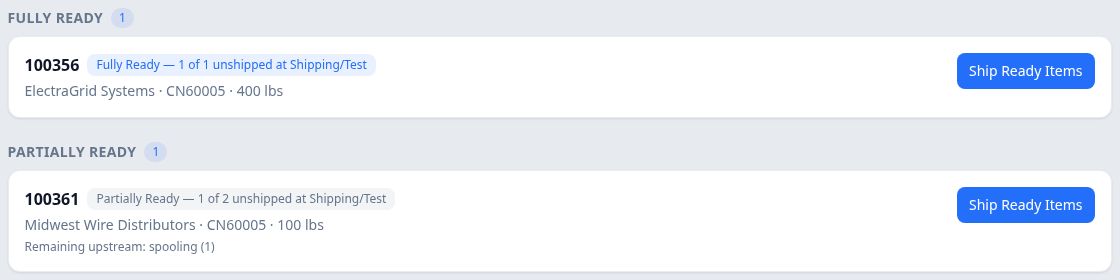
These counts refer to items represented by spool records. 1 of 2 does not establish that half the order's weight or footage is ready. The 100 lbs beside order 100361 is its order quantity, separate from the item count.
Read the order's readiness details
Select the order card's background to open Shipping Readiness. Selecting the order-number link opens the full order instead.
The readiness panel shows the order, account, part and quantity, followed by:
- Status: Fully Ready or Partially Ready.
- Ready at Shipping: ready items compared with all remaining unshipped items.
- Remaining upstream: other stages containing unshipped work, when present.
- Ready items: the individual ready items.
For order 100361, Ready at Shipping is 1 of 2 unshipped. Remaining upstream shows spooling — 1, and Ready items (1) lists SPL-2607-948344-345.
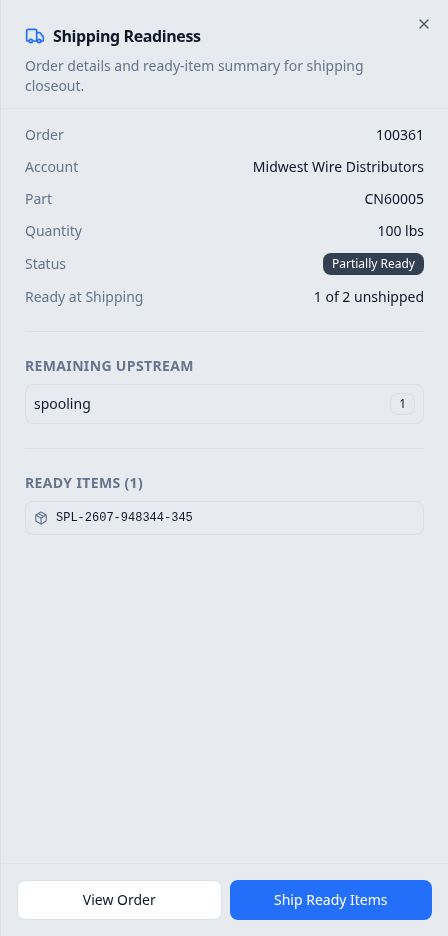
Select View Order, at the bottom of the panel, to inspect the full record. Close, at the upper right, returns to the queue.
What determines inclusion
Readiness uses the company's designated Shipping/Test stage and the order's saved production routing. The designated stage must be in that routing, and at least one unshipped item must be at that stage. Items already included in recorded shipments are excluded from the readiness counts.
An order with no ready unshipped items will not appear in either ready group. The queue is therefore a view of ready work, rather than a list of every open order.
Ready is different from shipped
Fully Ready means the remaining unshipped items have reached the designated stage. It does not itself record a shipment or confirm that closeout fields and documents have been completed.
For example, order 100356 is Fully Ready but its order record shows Shipments (0). Use shipment history to check what has actually been recorded. The Ship Ready Items workflow is a separate closeout procedure.