
Understand production completion versus shipment
Distinguish production progress, shipping readiness and recorded shipment events.
Three views answer different questions
| View | What it tells you |
|---|---|
| Production Progress and spool stages | Where work is represented in the order's production routing. |
| Shipping/Test → Active Queue | Which unshipped items have reached the designated shipping stage and whether other work remains upstream. |
| Shipments and Shipped History | Which items have been included in recorded shipment events. |
A completed-looking production route or a stage named Shipped does not, by itself, establish that a shipment has been recorded.
A Shipped stage can have no shipment record
Order 100361, for Midwest Wire Distributors, has two spool records: one at Spooling and one at Shipped. Its Shipments (0) card says No shipments recorded yet.
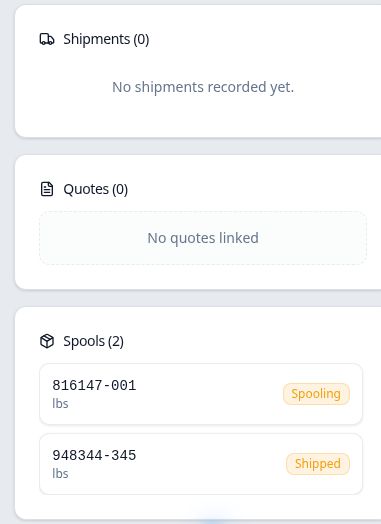
The Shipping/Test queue classifies this order as Partially Ready — 1 of 2 unshipped at Shipping/Test. The ready item is still unshipped in the shipment records.
Order 100356 makes the same distinction with no upstream items: it is Fully Ready — 1 of 1 unshipped, but its record also shows Shipments (0).
A recorded shipment identifies its included items
Order 100363, for GreenLine Filtration, has one spool and a dated shipment entry. Opening that entry from the order's Shipments card shows Included items (1) and SPL-2607-816259-001.
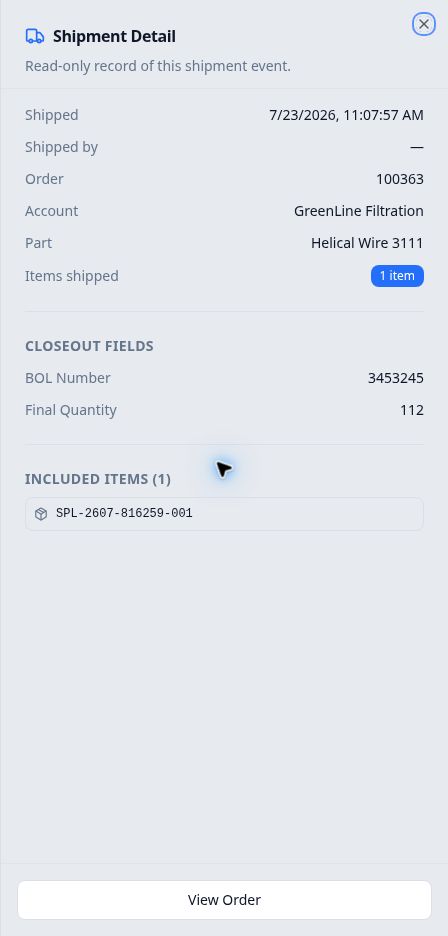
An order may have multiple shipment events. Review the individual events when checking which items have shipped.
How Open and Shipped order views relate
In Orders, the Shipped view is based on recorded shipments: the order must have at least one spool record, and every spool record must be included in a shipment. An order with unshipped items remains Open, even if a production stage is called Shipped or some items have already shipped.
Shipping readiness is also separate from this classification. Fully Ready still describes unshipped items waiting at the designated stage.
Which view should you check?
- To locate work or review the next operation, use Production or the order's Production Progress.
- To identify items waiting for shipping closeout, use Shipping/Test → Active Queue.
- To confirm a recorded shipment, open the order's Shipments card or Shipped History and inspect Included items.
Completing production and recording shipping closeout are separate workflow steps. This article explains the distinction; it does not perform or document the closeout procedure.