
Find an account and view its quotes and orders
Find a customer account, check its linked records, and open the relevant quote or order.
Before you start
You need access to Accounts and the customer record you want to review. This example uses Summit Precision Springs, with one quote, five orders and eight spools.
Find the account
- Search the account list
Select Accounts in the top navigation. In Search accounts..., above the table, enter part of the company name. For example, Summit finds Summit Precision Springs.
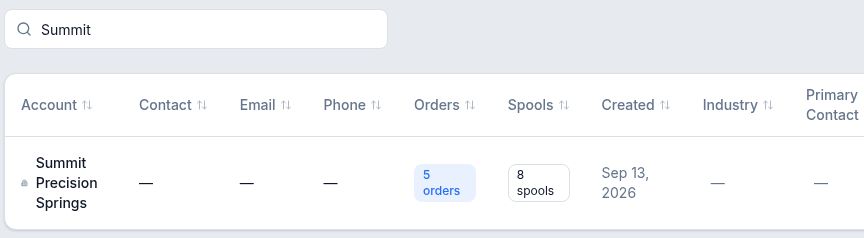
Search narrows the account table to the matching customer. If the page says No accounts found, shorten or clear the search before assuming the customer is missing. That message can appear for a search with no matches even when other accounts exist.
- Open the customer record
Select the account name. Confirm the company heading. The summary below it shows the number of linked orders, quotes and spools.
Open a linked quote or order
The Quotes and Orders cards are on the right of the account detail page. Each heading includes its record count.
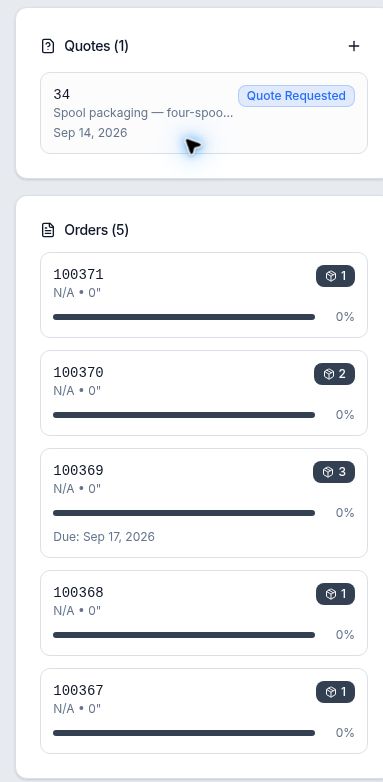
- Select a quote card to open the quote record. In this example, 34 opens Spool packaging — four-spool request at Quote Requested. Its draft revision can be opened from there.
- Select an order card to open the order record. 100371 opens the order for 25 lbs of C110 copper wire with one spool.
Use the account's linked record and its number to confirm you opened the intended work. Order cards in this example show N/A • 0" in their short specification summary; the full order record contains the saved wire description.
To choose another record, return through Accounts, search for the customer and reopen its detail page.
Expected result
When there are no linked quotes
An account can exist before it has a quote. For example, Cedar Ridge Spring & Wire shows Quotes (0) and No quotes yet, alongside two existing orders.