
Set account commercial defaults
Set payment terms, FOB and ship-via defaults, then check the values copied into a new draft quote.
Before you start
Open the customer account you want to update. You need permission to edit that account and create a quote.
Use Commercial defaults, below Properties on the account detail page. These fields are separate from any similarly named custom properties your company has added, such as Payment Terms.
Set the account's defaults
- Edit each commercial field
Click the current value, or the dash if blank, under Default payment terms, Default FOB or Default ship via. Enter the value and press Enter. Wait for it to return to its normal display before continuing.
This example initially used:
Account field Value Default payment terms Net 30 Default FOB Origin Default ship via Customer carrier - Reopen and confirm
Reopen the account and check the three values in Commercial defaults.
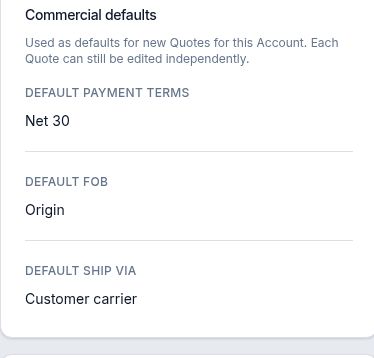
These were the account's saved defaults before quote 35 was created. - Create a new quote for that account
Select the plus button beside the account's Quotes heading. In New Quote, confirm the selected Account, enter the quote details and select Create Quote.
In this example, leaving Quote Number blank created quote 35, titled Protective packaging — 10 lb spools, with an initial Draft revision.
- Check the new revision's Commercial fields
Select Open Draft in Composer on the quote record. Under Commercial, confirm Payment terms, FOB and Ship via.
The new draft received Net 30, Origin and Customer carrier from the account.

The draft retained Net 30 even after the account's payment default was later changed to Net 45.
Changing defaults after a quote exists
Changing an account default did not update the already-created draft in this example. After Default payment terms on Harbor was changed to Net 45, reopening quote 35 still showed Net 30. Its other commercial fields also remained unchanged.
Check the existing draft's own values whenever the terms for that quote need attention. Do not assume an account-default change has updated it.