
Review an item's quoted-price history
Find saved quote prices for a catalog item and check the quote, revision, status, quantities and lead times.
Before you start
Open Quotes → Item Catalog. You need the catalog item whose earlier quoted prices you want to review.
Quote history can include draft offers. A price appearing here does not by itself mean the quote was issued or sent. Check the revision's status before relying on it.
Read the item's history
- Find and open the item
Search for the item number or name, then select its row. For this example, open PKG-SPOOL-25LB — Protective spool packaging.
The drawer opens on Details, where you can check the current item name, customer description and unit defaults.
- Switch to Quote history
Select Quote history, beside Details at the top of the drawer. Read the quote number, revision and status badge, then confirm the customer.
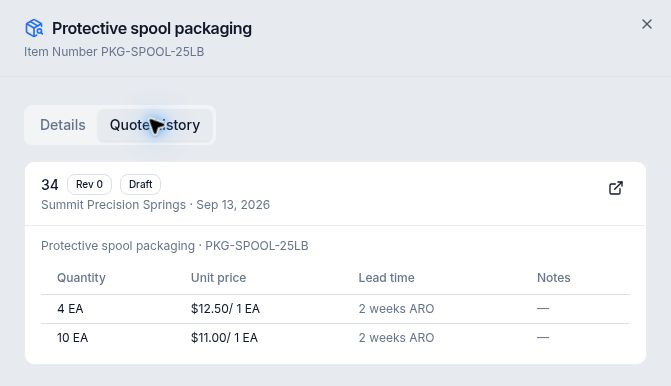
This entry is explicitly marked Draft; both quantity breaks belong to quote 34, revision 0. - Compare the complete offer
Read Quantity, Unit price, Lead time and Notes together. In this example:
Quantity Unit price Lead time 4 EA $12.50 / 1 EA 2 weeks ARO 10 EA $11.00 / 1 EA 2 weeks ARO The two rows are alternative quantity breaks on one saved draft line. Compare the price basis as well as the amount; a price per one item is different from a price per a larger quantity or another unit.
- Open the source quote
Select the quote number in the history card. The full quote record opens. Confirm the customer and revision, then open its draft in the Composer if you need to inspect the line description and pricing in context.
For quote 34, the packaging description and both price breaks match the saved line. Return to the catalog item's Details when you need its current reusable description and unit defaults.
Expected result
If history is empty
Before this item's first saved quote prices, the catalog picker showed No historical quotes reference this Catalog Item yet. Check that you selected the intended item and inspect the relevant saved quote line. Do not treat an empty history as a price of zero.