
Create a new revision of an issued quote
Revise an issued quotation in a new draft while preserving the earlier official document.
Before you start
You need an existing quote with an Issued revision. Issued revisions are read-only. Create a new draft when the quotation needs changes, so the earlier official document remains available.
The example starts with quote 36, Revision 0 Issued, containing one copper-wire line and a 25 LB offer with a three-week lead time.
Create and edit the new draft
- Check the existing revisions
Open the quote and inspect Quote Revisions, on the right side of the desktop page. Identify the Issued revision and check whether a Draft already exists.
If there is already a Draft, use Open Draft in Composer at the top of the quote, or Open in Composer on that Draft entry. Continue the existing draft instead of expecting another revision to be created.
- Create the revision
If no Draft exists, select Create Revision near the top of the quote. The new revision opens in Composer.
In the example, WireTrack created Rev 1, marked draft, and copied the title, customer, currency, section, product description and offer from the issued Revision 0. Check the copied information before changing it.
- Make and save the change
Select the line you want to change. Update the relevant field and select Save in the line editor.
The example changes Lead time (optional) from 3 weeks ARO to 4 weeks ARO. Quantity 25 LB, price $8.50 per 1 LB and extended value $212.50 remain the same.
Select Preview and review the saved result.

Only the draft lead time changed in this example. - Reopen the same draft
Select Back to Quote. Quote Revisions now lists the new Draft and the earlier Issued revision.
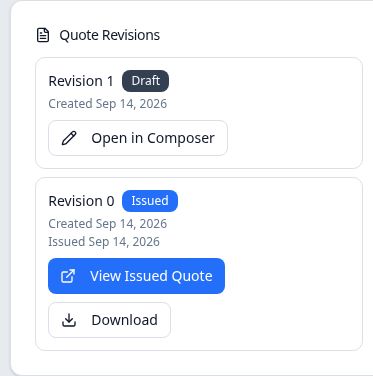
The new draft and the earlier issued document remain separate entries. Select Open Draft in Composer or the Draft entry's Open in Composer. Confirm the same revision number and saved change. In the example, reopening returned to Revision 1 with the four-week lead time; it did not create Revision 2.
Check the earlier official document
From Quote Revisions, select View Issued Quote on the earlier Issued entry. The saved Revision 0 PDF still shows 3 weeks ARO, while the new draft shows 4 weeks ARO.
A saved draft revision is not an updated official PDF. When its changes are ready, use the separate issuance procedure for that draft. This example leaves Revision 1 as Draft.