
Move a quote through the sales pipeline
Record Sent, Won or Lost and distinguish the sales outcome from document revision status.
Before you start
Open the intended quote from Quotes. Its Stage, under Properties, records its sales position. Quote Revisions records the separate Draft/Issued status of its documents.
| Stage | Use it to record |
|---|---|
| Quote Requested | A quote request awaiting the next sales step. |
| Quote Sent | The quotation has been sent to the customer. |
| Quote Won | Accepted work handed off through the order-creation workflow. |
| Quote Lost | The opportunity was not won. |
Won and Lost are alternative outcomes. You do not need to move a lost opportunity through Won first.
Record Sent
- Check the quote and current stage
Confirm the quote number, title and account. Find Stage under Properties and Quote Progress in the middle column of the desktop page.
- Update the stage
For a quote at Quote Requested, select Advance to Quote Sent in Quote Progress. Alternatively, open Stage and choose Quote Sent.
The example used the progress button for quote 36 and the Stage menu for quote 37. Both saved Quote Sent and displayed a Sent Date.
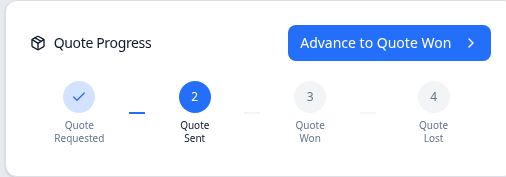
The progress card shows the current stage and the next available action. - Check the saved result
Reopen the quote and confirm its Stage. Check Quote Revisions separately if you need to know which document is Draft or Issued.
Record the outcome
Won
From Sent, select Advance to Quote Won, or select Quote Won in the Stage menu. The quote page opens Create Order from Quote. Review the account and part, enter the order quantity, and complete the order handoff described in the related article.
In the example, canceling this form left the quote at Sent with no linked order, even though the form's introductory text said the quote had been won. Completing Create Order linked Order 100372, saved Quote Won, and displayed a Decision Date.
Lost
Open Stage, select Quote Lost, then reopen the quote to confirm the result. Quote 37 retained Quote Lost, displayed a Decision Date, and had no linked order.
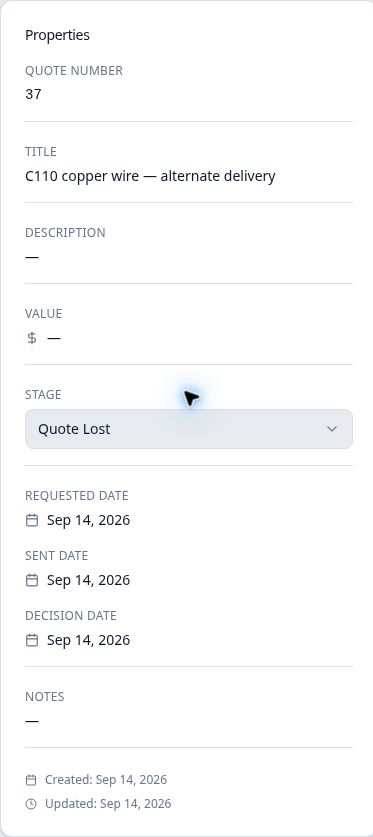
The progress graphic lists Won before Lost, but that does not mean the lost opportunity was previously won. Use Stage to confirm its recorded outcome.
Keep sales status separate from documents and activities
A stage change is not a substitute for issuing a document or delivering it to the customer. Quote 36's Revision 0 was Issued while its stage was still Requested. Quote 37 moved to Sent and Lost while Revision 0 remained Draft.
Use the activity and task records to review follow-up work separately. The stage and revision labels answer different questions; neither is a record of a customer message by itself.