
Log quote activities and follow-ups
Record a conversation on a quote and keep the next action in a separate linked task.
Before you start
Open the relevant quote and check its number, title and linked Account. This example uses quote 35, Protective packaging — 10 lb spools, for Harbor Spring Products.
Use Activities to record what happened, such as a call or a note. Use Tasks for work that still needs to be done. Choosing Email as an activity type records an entry; it does not send an email.
Add an activity
- Open Add Activity
In the quote's Activities card, below Tasks, select Add beside the heading.
- Choose the type and enter the details
Choose a Type that describes the entry. The form offers Call, Email, Note, Meeting and Other. This example records a Call.
Enter a Title and a Description. The title is required; Add Activity stays disabled while it is empty.
Field Example Type Call Title Review 10 lb spool packaging Description Discussed protective wrap, edge guards and keeping heat labels visible. Confirm packaging availability before preparing the final quote. 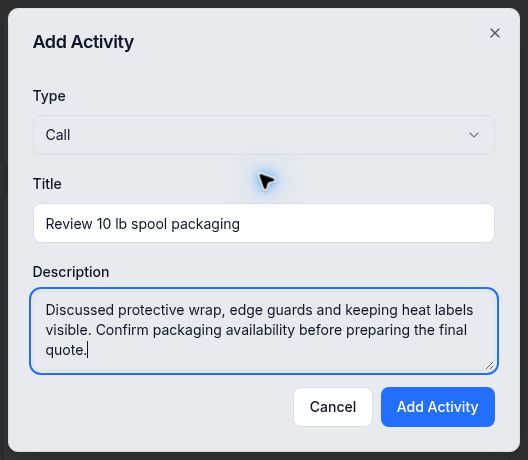
Record the conversation and its useful details. - Save and review the entry
Select Add Activity once. Wait for the form to close, then check the saved entry under Activities, including its title and displayed date/time. A long description may be shortened in the feed.
Reopen the quote if you need to confirm that the entry persisted.
Review a related follow-up task
An existing follow-up task appears separately in the quote's Tasks card, under Open. Check its note and linked quote to identify the next action. This example shows Confirm protective wrap and edge-guard availability for four 10 lb spools.
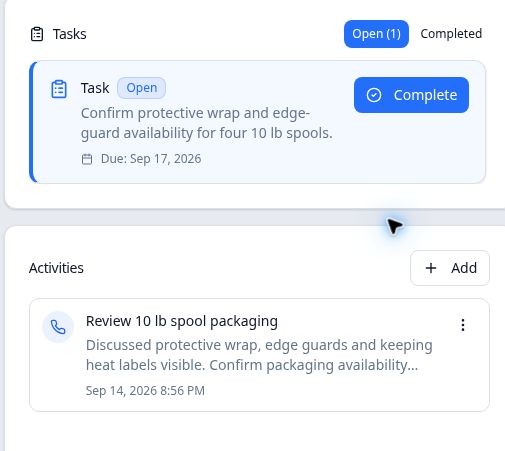
If the task's displayed due date is unexpected, confirm the intended date with the responsible person before relying on it. Creating tasks and resolving date discrepancies are outside this guide's scope.
Expected result
This procedure covers adding a manual activity and reviewing existing follow-up tasks. Automatic follow-ups triggered by quote-stage changes are outside its scope.